Enter your destination to get a totals estimate.
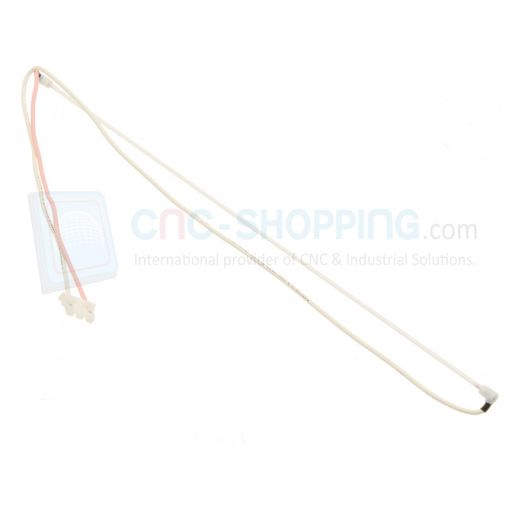
A61L-0001-0168#BL Fanuc Sharp LQ10D367 LQ10D368 LCD Backlight
Starting at €75.00
Manufacturer's Suggested Retail Price (11-2025): €140.00
Product condition Availability Warranty
Price
Your savings on Manufacturer's suggested retail price: -€3.00
Estimate Totals
Buy online your brand new FANUC Backlight A61L-0001-0168#BL (compatible for Sharp SHARP LQ10D367, LQ10D368, LQ10D368A LQ1DD367, LQ1DD368) for FANUC 10.4Iinch LCD Screen in Stock available from our Cnc-shopping e-store. Small backlight fitted on back of the Fanuc A61L-0001-0168 LCD Monitor connected to the Inverter module of your Fanuc CNC i series such as Fanuc 16i, 18i, 21i or even some 0i. These FANUC A61L-0001-0168 backlights are brand new and come with a warranty.
This will help you when your FANUC LCD Monitor turns dark or can not see any brightness (light).
THIS FANUC A61L-0001-0168#BL BACKLIGHT IS MADE OF GLASS, MAKE SURE TO UNPACK IT WITH CARE DURING THE DELIVERY (TO AVOID TO DAMAGE IT)
A backlight is a form of illumination used in liquid crystal displays (LCDs). As LCDs do not produce light themselves (unlike for example Cathode ray tube (CRT) displays), they need illumination (ambient light or a special light source) to produce a visible image. Backlights illuminate the LCD from the side or back of the display panel, unlike frontlights, which are placed in front of the LCD. Backlights are used in small displays to increase readability in low light conditions such as in wristwatches, and in computer displays and LCD CNC Monitors to produce light in a manner similar to a CRT display. Fanuc A61L-0001-0168#BL
Compatible with FANUC A02B-0236-K116
How to Detect a Defective Backlight on your Fanuc A61L-0001-0168 LCD Monitor using SHARP LQ10D367 LQ10D368 monitors ?
The Fanuc A61L-0001-0168 LCD monitor is a crucial LCD industrial usually instaled on Fanuc CNC i controllers of Machine-tools , providing Fanuc 16i, 18i, 21i, 0i operators with essential visual feedback. However, like any electronic device, it can suffer from issues over time, particularly with its backlight CCFL. A defective backlight can render the monitor unusable, leading to downtime and potential loss in productivity. At Cnc-shopping, we will explore how to detect if the backlight of a Fanuc A61L-0001-0168 LCD monitor is defective, signs of a defective backlight, and some tests you can perform to confirm the issue.
Signs of a Defective Fanuc A61L-0001-0168 Sharp LQ10D367 LQ10D368 Backligtht ?
Dim or Flickering Display: One of the most common signs of a defective backlight is a dim or flickering screen. If the display is not as bright as it used to be or if it flickers intermittently, the backlight may be failing.
No Display with Power On: If the Fanuc/Sharp monitor powers on but displays no image, it might be due to a backlight failure. You might still see a faint image on the screen if you shine a flashlight on it, indicating that the LCD is working but the backlight is not.
Color Distortion: A failing backlight may cause colors on the screen to appear distorted or washed out. This is because the full spectrum of light needed to accurately display colors is not being provided.
Uneven Brightness: If parts of the screen are brighter than others, this could indicate that the backlight is failing in certain areas.
How to Recognize a Defective Fanuc A61L-0001-0168 Sharp LQ10D367 LQ10D368 Backligtht ?
-
Visual Inspection: Start by visually inspecting the monitor for any obvious signs of damage or wear. Look for any physical damage to the backlight or its connections.
-
Listen for Noise: Sometimes, a failing backlight may emit a faint buzzing or humming noise. This can be a sign of electrical issues within the backlight's circuitry.
-
Use a Flashlight: As mentioned earlier, if the display is black, shine a flashlight at an angle onto the screen. If you can see a faint image, the issue is likely with the backlight.
Tests to Confirm Backlight Issues ?
-
Fanuc small Inverter Board Test: The Fanuc inverter board supplies power to the backlight. If you suspect a backlight issue, test the inverter board with a multimeter to ensure it is supplying the correct voltage. If the inverter board is faulty, it can cause the backlight to fail. (You can see this small inverter in the back of your Fanuc CNC Controller, right below the Fanuc backplane, near the motherboard (covered by the Yellow plastic case)
-
Backlight Swap Test: If possible, swap the backlight with a known working one. If the new backlight works, then the original backlight is defective. This test can also be conducted for the Fanuc inverter PCB.
-
Continuity Test: Use a multimeter to check the continuity of the backlight circuit. A lack of continuity indicates a break in the circuit, which could mean a defective backlight.
Conclusion
Detecting a defective backlight on a Fanuc A61L-0001-0168 LCD monitor involves recognizing the signs of failure, performing visual and auditory inspections, and conducting specific tests to confirm the issue. By identifying the problem early, you can prevent further damage and minimize downtime. If you're not comfortable performing these tests yourself, consider consulting with a CNC professional technician to ensure your monitor is properly diagnosed and repaired. Regular maintenance and inspections can also help prolong the life of your monitor and prevent backlight issues from occurring.
| Availability | Immediate shipment |
|---|---|
| Weight | 3.00 kgs |
Delivery options
Express delivery to 220 countries
-
 DHL ExpressFind out moreDHL Worldwide Express - 24H/48H Express delivery to 220 countries, delivered against Proof of Signature. - Tracking Number to track it on DHL network.
 -
 UPS ExpressFind out moreUPS Worldwide Express - 24H/48H Express delivery to 220 countries, delivered against Proof of Signature. - Tracking Number to track it on UPS network.
Standard delivery to 72 countries
-
DHL SelectFind out moreStandard delivery by DHL Select for EUROPE only (48H-72H depending of your country in EUROPE) with Proof of Signature at the delivery. - Tracking Number to track it online on DHL network.
-
 Colissimo Intl.Find out moreEconomy/Standard International post (4 to 7 days, depending of your country) Delivered with a proof of signature. Tracking Number is provided for traceability on the French Colissimo postal network & your Country local postal service.
Need help finding the right product ?
Contact us
We found other products you might like!